
Your application just survived months of development, passed every unit test, cleared code review, and sailed through QA. Then launch day arrives, 3,000 users hit the checkout flow simultaneously, and the database connection pool exhausts in under ninety seconds. The site goes down. Revenue hemorrhages. The post-mortem reveals an uncomfortable truth: a single 30-minute load test would have caught the connection pool ceiling at 800 concurrent users — three weeks before go-live.
This scenario repeats across industries because most teams either skip load testing, run it too late, or execute tests that produce misleadingly healthy numbers. Performance degradation is incremental and invisible without measurement: “a 10 ms response time might turn into 50 ms, and then into 100 ms” — and nobody notices until users do [1].
This guide is not another conceptual overview. It is a practitioner-level playbook covering every phase of a load test from goal definition through bottleneck diagnosis. You will walk away with a repeatable process for environment architecture, scenario design, think-time calibration, ramp-up strategy, execution, results interpretation, and CI/CD integration. Each step includes specific metrics, configuration examples, and the pitfalls that silently invalidate results.
Here is the roadmap: (1) define measurable goals, (2) build an isolated test environment, (3) design realistic scenarios, (4) configure ramp-up and load profiles, (5) execute and monitor, (6) interpret results and diagnose bottlenecks, and (7) integrate into CI/CD for continuous validation.
- What Is Load Testing (And Why Most Teams Get It Wrong)
- Step 1 — Define Your Goals: What Does ‘Pass’ Actually Look Like?
- Step 2 — Build Your Load Test Environment: Isolation Is Not Optional
- Step 3 — Design Realistic Load Test Scenarios
- Step 4 — Configure Your Ramp-Up Strategy and Load Profile
- Step 5 — Execute, Monitor, and Analyze: Turning Raw Data Into Release Decisions
- Step 6 — Integrate Load Testing Into Your CI/CD Pipeline
- Frequently Asked Questions
- References
What Is Load Testing (And Why Most Teams Get It Wrong)
Load testing simulates real user concurrency against a system to validate behavior under expected and peak conditions. It answers a specific question: does the system meet its SLA targets when the anticipated number of users are active simultaneously? That question is distinct from the ones answered by stress testing (where does the system break?), spike testing (can the system survive sudden traffic surges?), or soak testing (does performance degrade over extended periods?). For a foundational overview of these concepts, see our beginner’s guide to load testing.
The most dangerous misconception is that any load test is better than none. A test with zero think time, hardcoded session tokens, and a single product ID in the request pool will show you a system that appears to handle 2,000 users — because the CDN cache served 98% of responses and the database never executed a real query. That false confidence is worse than ignorance; it creates organizational certainty that the system is production-ready when it categorically is not.
The Standard Performance Evaluation Corporation (SPEC) frames load testing within the discipline of quantitative system evaluation, encompassing “classical performance metrics such as response time, throughput, scalability and efficiency” alongside “the development of methodologies, techniques and tools for measurement, load testing, profiling, and workload characterization” [2]. These are not vendor-specific metrics — they are internationally recognized measurement science.
Load Testing vs. Stress Testing vs. Performance Testing: The Definitions That Actually Matter
Performance testing is the umbrella discipline. Load testing and stress testing are specific test types within it, each answering a different question — and understanding these different types of performance testing is essential before designing any test:
| Test Type | Question Answered | Typical VU Range | Duration | Environment Prerequisites |
|---|---|---|---|---|
| Smoke | Does the system function under minimal load? | 1–5 VUs | 1–3 min | Any stable environment |
| Average-Load | Does the system meet SLAs at expected concurrency? | Production average VUs | 20–60 min | Production-representative data and infra |
| Stress | At what concurrency does the SLA break? | 1.5x–3x production peak | 30–60 min | Full production-equivalent infra |
| Spike | Can the system absorb sudden traffic surges? | 5x–10x baseline in seconds | 5–15 min | Autoscaling enabled, CDN configured |
| Breakpoint | What is the absolute maximum capacity? | Incremental increase until failure | Variable | Isolated infra with monitoring |
| Soak | Does performance degrade over time? | Production average VUs | 4–24 hours | Full production-equivalent with DB state |
If your SLA targets 500 concurrent users with p95 latency under 300 ms, a load test validates exactly that. A stress test deliberately pushes to 750, 1,000, and 1,500 users to find where that 300 ms ceiling breaks. Confusing the two leads to misconfigured tests and stakeholder misalignment about what the results actually prove.
The Business Case: What a Failed Load Test Actually Costs
A retail site generating $50,000 per hour during a peak sale loses that amount for every hour of downtime — and a spike test simulating the promotional traffic surge would have identified the load balancer misconfiguration that caused the outage. Financial transaction processing systems face SLA penalties of $10,000–$100,000 per incident when settlement windows are missed due to database timeout cascading.
DORA’s multi-year research across 39,000+ technology professionals establishes that continuous automated testing — including nonfunctional performance tests — drives “improved software stability, reduced team burnout, and lower deployment pain” [3]. This reframes load testing from a pre-release checkbox to an organizational health investment.
The Google SRE Book provides the MTTR argument directly: “Zero MTTR occurs when a system-level test is applied to a subsystem, and that test detects the exact same problem that monitoring would detect” [1]. Every load test that catches a bottleneck before release is an incident that never happens.
When in the SDLC Should You Run a Load Test?
The “load test only before go-live” pattern is an anti-pattern. By that point, architectural decisions are baked in, deadlines are non-negotiable, and any bottleneck discovered becomes a crisis rather than an engineering task. A shift-left approach to performance engineering catches regressions when they are cheapest to fix — during development, not after release.
| SDLC Phase | Test Type | Duration | Frequency |
|---|---|---|---|
| Sprint / Build | Smoke + baseline load | 5–10 min | Every build in CI pipeline |
| Integration / Staging | Average-load + stress | 30–60 min | Every release candidate |
| Pre-Release | Full load + spike + soak | 1–24 hours | Before each major deployment |
| Post-Deployment | Lightweight canary load | 10–15 min | Daily or on config changes |
DORA’s guidance is explicit: “Perform all types of testing continuously throughout the software delivery lifecycle” including “nonfunctional tests such as performance tests and vulnerability scans” running “against automatically deployed running software” [3].
Step 1 — Define Your Goals: What Does ‘Pass’ Actually Look Like?
Before opening any tool, document explicit, measurable success criteria that the entire team — engineering, QA, product, and operations — agrees on. Without these, you cannot interpret results; you can only stare at graphs and argue about whether the numbers look “okay.”
Translating Business Requirements into Load Test Parameters
Start with production analytics, not assumptions. Extract peak concurrent sessions from your APM tool or web analytics platform, transaction volumes from business systems, and session duration distributions from access logs.
Use Little’s Law to convert these into virtual user counts:
L = λ × WWhere L = concurrent users, λ = arrival rate, W = average session duration.
Example: 1,000 new sessions per hour × 3-minute average session duration = 50 concurrent users at steady state. If your peak hour sees 5,000 sessions per hour with 4-minute average duration, that is 333 concurrent users — your load test target.
Production data is the only trustworthy input. Estimated concurrency based on “we think we’ll get about 500 users” has repeatedly been the root cause of tests that pass in staging and fail on launch day.
Setting Pass/Fail Thresholds That Actually Mean Something
Generic thresholds like “response time under 2 seconds” are inadequate because they mask the distribution. A p50 of 200 ms and a p99 of 6,000 ms both produce an “average” well under 2 seconds — but 1% of your users (potentially 10,000 people per day at scale) experience a six-second wait on every request. Understanding which performance metrics truly matter is critical to setting meaningful thresholds.
Here is a concrete success criteria template:
System: E-commerce checkout API
Concurrency: 400 VUs sustained for 30 minutes
Pass criteria:
- p50 latency: < 150 ms (all endpoints)
- p95 latency: < 400 ms (API), < 800 ms (checkout flow)
- p99 latency: < 1,200 ms (all endpoints)
- Error rate: < 0.5% (HTTP 5xx)
- Throughput: > 1,200 req/s sustained
- Server CPU: < 75% sustained average
- DB connection pool: < 80% utilization
Fail criteria: Any single metric breached for > 2 consecutive minutes
Each percentile tells a different story. The p50 represents the median experience; the p95 catches the degradation pattern affecting your most engaged users (those executing the most complex flows); the p99 exposes infrastructure-level failures like garbage collection pauses or connection pool exhaustion that hit a small but significant portion of traffic. WebLOAD’s built-in SLA violation alerting enforces these thresholds automatically during execution, flagging breaches in real time rather than requiring post-hoc analysis.
Step 2 — Build Your Load Test Environment: Isolation Is Not Optional
Environment setup is where most load tests silently fail. If your load generator, system under test, and monitoring agents share CPU cycles on the same host, you are measuring infrastructure contention — not application performance.
Cloud vs. On-Premises: Choosing the Right Load Generation Architecture
A common misconception is that cloud-based load generation introduces artificial network latency that distorts results. The opposite is often true: if 70% of your real users are in US-East, generating load from US-East cloud instances more accurately represents production network conditions than on-premises generators in your data center.
WebLOAD’s distributed load generation architecture orchestrates multiple generator machines — cloud, on-prem, or both — from a single console, making the hybrid model operationally straightforward.
Database and Third-Party Dependency Handling: The Hidden Variables
Two environment mistakes silently invalidate results:
Database scale mismatch: A query that full-table-scans 100 rows in 5 ms will take 2,800 ms against 50 million rows when the optimizer chooses a different execution plan. Your staging database must contain production-representative data volumes — at minimum within 10x of production row counts for the tables your application queries during tested flows.
Third-party API inclusion without isolation: Payment gateways, analytics SDKs, and CDN origins have independent rate limits and latency profiles. Including them in a load test without stubbing means you are testing their infrastructure, not yours. Use mock services in containers for external dependencies and test your integration with the real services separately at lower concurrency.
Environment Readiness Checklist: 12 Items to Verify Before You Start
- Load generator machines are on separate hosts from the system under test: Y/N
- Monitoring/APM agents are NOT running on load generator hosts: Y/N
- Database row counts are within 10x of production volume for tested tables: Y/N
- Database indexes match production schema exactly: Y/N
- Load balancer configuration (algorithm, sticky sessions, health checks) mirrors production: Y/N
- SSL/TLS certificates are valid and not causing handshake warnings: Y/N
- Firewalls and WAF rules allow load generator IP ranges without rate-limiting: Y/N
- Third-party APIs are stubbed or explicitly included with documented rate limits: Y/N
- Data state reset procedure is documented and tested between runs: Y/N
- All application caches are in the expected state (cold or warm, matching your test plan): Y/N
- Network bandwidth between load generators and SUT matches or exceeds production user paths: Y/N
- Disk I/O on database servers is not throttled by virtualization host contention: Y/N
Step 3 — Design Realistic Load Test Scenarios
Scenario design separates tests that produce actionable data from tests that produce false green lights.
Mapping User Journeys: From Analytics Data to Virtual User Scripts
Extract the top 3–5 user flows from production access logs or APM data. For a typical e-commerce platform:
| Scenario | Traffic Share | Steps | Think Time (mean) |
|---|---|---|---|
| Browse catalog | 60% | Homepage → Category → Product detail → Product detail | 5s between pages |
| Add to cart | 25% | Browse flow → Add item → View cart | 3s between actions |
| Checkout | 10% | Cart → Shipping → Payment → Confirmation | 8s between steps |
| Search | 5% | Homepage → Search query → Results → Product detail | 4s between steps |
Record production sessions using HAR file capture or your load testing tool’s HTTP recording capability, then parameterize dynamic values. A GET /product/{id} that represents 34% of requests becomes a parameterized browse scenario drawing from a data pool of 10,000+ unique product IDs. For a deeper dive into this process, see our guide on creating realistic load testing scenarios.
Lesson from the field: The single most common scenario design failure is testing only the happy path. In production, 20–40% of traffic consists of failed logins, search queries returning zero results, session timeouts, and back-button navigation. Excluding these creates an artificially favorable load profile.
Think-Time Calibration: The Realistic Pause That Most Teams Skip
Think time — the pause between user actions — has an outsized impact on server resource utilization. Consider three configurations hitting the same endpoint at 500 VUs:
| Think Time Config | Effective Req/s | CPU Utilization | Connection Pool Usage |
|---|---|---|---|
| Zero (no pause) | ~5,000 req/s | 98% (unrealistic) | 100% — pool exhausted |
| Fixed 3 seconds | ~167 req/s | 42% | 35% |
| Gaussian (μ=3s, σ=1.5s) | ~167 req/s (avg) | 44% with realistic variance | 38% with natural peaks |
Zero think time transforms 500 virtual users into a denial-of-service attack. Fixed think time is better but creates an artificially uniform request pattern. Real users follow a log-normal or Gaussian distribution — some pause for 1 second, others for 12 seconds while reading content. The Gaussian model with a reasonable standard deviation produces the most production-representative server resource utilization patterns.
Parameterizing Test Data: Why Hardcoded Values Break Your Tests
Hardcoded values in scripts create three invisible failures:
Before (hardcoded):
// Every VU logs in as the same user, requests the same product
wlHttp.Get("https://api.example.com/product/12345");
wlHttp.Post("https://api.example.com/login", {user: "testuser1", pass: "test123"});
After (parameterized):
// Each VU uses unique credentials from a 10,000-row data pool
var userId = wlTable.getValue("users.csv", "username", wlVars.rowIndex);
var productId = wlTable.getValue("products.csv", "id", wlRandom(0, 9999));
wlHttp.Get("https://api.example.com/product/" + productId);
The hardcoded version fails to test: database row locking under concurrent access, session state uniqueness, CDN cache bypass (one product ID = 99% cache hits, making the origin server look 10x faster than it actually is), and authentication system behavior under diverse credential loads. RadView’s platform includes a correlation engine that automatically identifies session tokens and dynamic values requiring extraction and reuse across script steps.
Protocol-Based, Browser-Based, or Hybrid? Choosing the Right Scripting Approach
The scripting approach you choose determines what your test can and cannot measure. Each has distinct trade-offs:
| Criteria | Protocol-Level | Real-Browser | Hybrid |
|---|---|---|---|
| Realism for API/backend testing | High | Overkill | High |
| Captures client-side rendering time | No | Yes | Yes |
| Resource cost per virtual user | Low (~1-5 MB RAM) | High (~200-500 MB RAM) | Mixed |
| JavaScript-heavy SPA coverage | Misses client-side bottlenecks | Full coverage | Full coverage |
The hybrid approach catches issues that pure protocol testing misses. Example: a React SPA where the server responds in 90ms but client-side rendering and hydration take 3.2 seconds. For API-focused load tests, protocol-level scripting gives you the highest VU density per generator machine. For end-to-end user experience validation, real-browser testing captures the full picture — at the cost of needing significantly more infrastructure to generate equivalent concurrency.
Step 4 — Configure Your Ramp-Up Strategy and Load Profile
How you ramp load determines whether you can isolate the concurrency level where degradation begins.
| Profile Shape | Configuration | Best For |
|---|---|---|
| Linear ramp | Add VUs at constant rate over time | General-purpose; good default |
| Stepped ramp | Add 50 VUs every 5 min, hold 10 min per step | Diagnostic gold standard — isolates degradation threshold |
| Spike | Jump from baseline to peak in < 30 seconds | Validating autoscaling and queue behavior |
| Steady-state | Ramp to target, hold for extended duration | Soak testing and sustained SLA validation |
The stepped ramp is the diagnostic gold standard because holding each plateau for 5–10 minutes allows JVM garbage collection cycles, connection pool warm-up, and cache stabilization to complete before you add more load. Without this stabilization window, you cannot distinguish “the system is still warming up” from “this concurrency level causes degradation.”
Warm-Up, Steady State, and Cool-Down: The Three Phases Every Test Needs
Every well-designed load test has three phases, and the warm-up phase must be excluded from SLA analysis:
- Warm-up (5–8 min for JVM apps, 2–3 min for interpreted languages): JIT compilation, connection pool initialization, and cache priming produce artificially high response times that do not represent steady-state behavior. Including this data inflates your p95 and p99 metrics.
- Steady state (20–60 min minimum): The actual measurement window. All pass/fail criteria are evaluated against this phase only.
- Cool-down (3–5 min): Gradual load reduction to observe recovery behavior and resource release patterns.
Distributed Load Generation: Scaling Beyond a Single Machine
A single load generator typically saturates its outbound NIC or CPU before 500–1,000 concurrent HTTP/S connections, depending on response payload size and script complexity. Monitor the generator’s own CPU (should stay below 80%) and network utilization (below 70% of NIC capacity). Once either threshold is reached, your generator — not the system under test — is the bottleneck.
Distribute across multiple generator nodes, matching their geographic placement to your real user distribution. If 40% of traffic originates from Europe and 60% from North America, configure your generators in the same proportions.
Step 5 — Execute, Monitor, and Analyze: Turning Raw Data Into Release Decisions
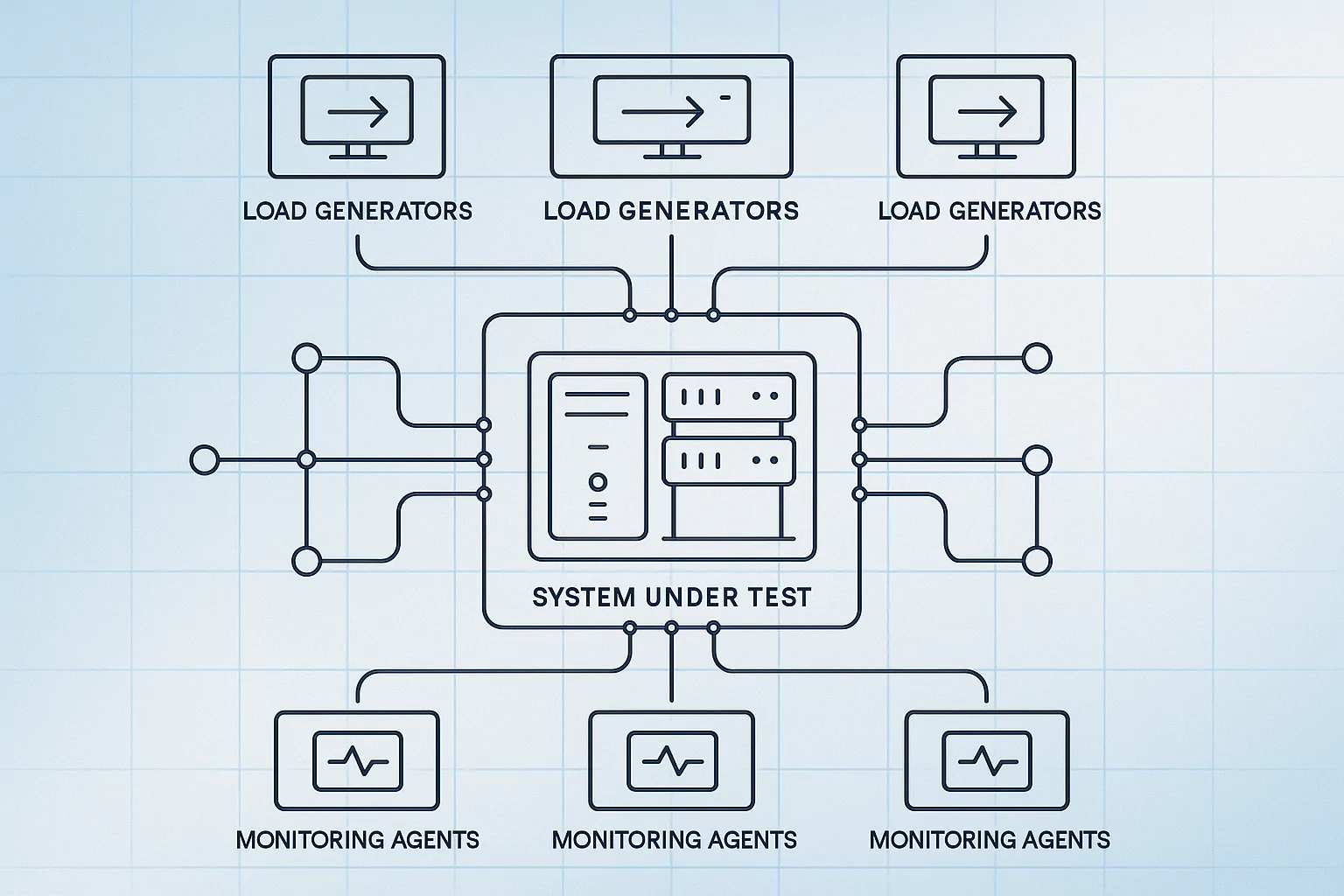
During execution, monitor both client-side metrics (response time, throughput, error rate from the load testing tool) and server-side metrics (CPU utilization, memory, disk I/O, network bandwidth, connection pool usage, garbage collection frequency) simultaneously. The correlation between these two views is where actionable insights live — a p99 latency spike that coincides with a GC pause tells a completely different story than one that coincides with connection pool saturation.
The analysis framework for turning raw data into release decisions:
- Validate the test before trusting results. Did the load generators themselves become a bottleneck? Check generator CPU — if it exceeded 80%, your throughput numbers are artificially capped. Did error rates spike at the beginning due to cold caches or connection pool warm-up? Exclude the warm-up phase from SLA evaluation.
- Evaluate against your pre-defined SLOs. Compare p95 and p99 response times against the thresholds you defined in Step 1. A pass/fail decision against documented criteria is infinitely more useful than “the numbers look okay.”
- Correlate client and server metrics. When p99 response time spikes at 400 concurrent users, check server CPU, connection pool utilization, memory pressure, and GC frequency at the same timestamp. If CPU is at 35% but connection pool is at 98%, you have a pool sizing issue — not a compute capacity issue. If CPU is at 92% and all percentiles degrade uniformly, you need more instances.
- Document and share. A load test report that lives in someone’s head is worthless. Archive results with the build ID, the exact scenario configuration, environment details, and the pass/fail verdict — so that the next team member running the same test can compare results without recreating your analysis from scratch.
Step 6 — Integrate Load Testing Into Your CI/CD Pipeline
A load test that runs manually before major releases catches problems. A load test wired into your CI/CD pipeline prevents them from reaching staging in the first place. DORA’s research consistently shows that teams with automated testing gates deploy more frequently with lower change failure rates [3].
The conceptual pipeline integration looks like this:
stage: load_test
  trigger: merge_to_main OR nightly_schedule
  steps:
    - provision_load_generators(count: 3, region: us-east-1)
    - execute_load_test(scenario: checkout_peak, duration: 15m, users: 500)
    - evaluate_results:
        fail_if: p95_response_time > 500ms OR error_rate > 1%
    - archive_results(destination: s3://perf-results/{build_id})
  on_failure: block_deployment AND notify_slack(channel: #perf-eng)
WebLOAD’s CLI integration enables triggering load test scenarios directly from Jenkins, GitLab CI, GitHub Actions, or Azure DevOps — with results piped back to the pipeline as structured JSON for automated gate evaluation. For a deeper guide on pipeline integration patterns, see integrating performance testing into CI/CD pipelines.
The “stale test” trap is real: teams wire a test into their pipeline once, and 18 months later it’s still running the same scenario against a product that has changed fundamentally. Review your workload model quarterly, or immediately after any shift greater than 10% in production traffic patterns.
Frequently Asked Questions
How many virtual users should my first load test target?
Start with production data, not guesswork. Pull peak concurrent sessions from your APM tool and apply Little’s Law (concurrent users = arrival rate × average session duration). If you’re pre-launch with no production data, model from business projections — then add 50% headroom. A test targeting 500 VUs when your actual peak is 200 produces useful capacity insight. A test targeting 50 VUs when your actual peak is 2,000 produces dangerous false confidence.
My load test passes in staging but the app fails in production — what’s wrong?
Almost always an environment mismatch. The three most common culprits: staging database has 10,000 rows versus production’s 50 million (query plans differ radically at different data volumes), staging has no CDN or WAF in front of it (so you’re testing a different network path), and staging connection pools are sized differently than production. Use the 12-item environment checklist in Step 2 to audit parity before your next test run.
Should I include third-party API calls (payment gateways, analytics) in my load test?
Not by default. Third-party services have their own rate limits and performance characteristics that you can’t control — and including them means you’re testing their infrastructure, not yours. Stub external dependencies with mock services for your main load tests. Then run a separate, lower-concurrency integration test against the real third-party endpoints to validate timeout handling and fallback behavior under realistic latency conditions.
How long should a load test run to produce reliable results?
The minimum is 20 minutes of steady-state after warm-up completes — enough for 2-3 garbage collection cycles on JVM-based systems and for connection pool behavior to stabilize. For soak tests targeting memory leak detection, 4-8 hours minimum. For SLA validation ahead of a major release, 30-60 minutes of steady-state at target concurrency. A 5-minute test is a smoke test, not a load test — it won’t surface pool exhaustion, memory drift, or cache expiration effects.
What’s the single most common mistake that invalidates load test results?
Zero think time. Setting no pause between virtual user requests transforms 500 VUs into a sustained DDoS-level request rate that no real user population would generate. This either makes your system look broken (because it can’t handle unrealistic traffic) or makes it look healthy (because the CDN absorbs everything before the origin sees it). Use a Gaussian think-time distribution with a mean matching your actual user behavior — typically 3-8 seconds between page actions for web applications.
References
- Perry, A. & Luebbe, M. (2017). Chapter 17: Testing for Reliability. In B. Beyer, C. Jones, J. Petoff, & N. R. Murphy (Eds.), Site Reliability Engineering: How Google Runs Production Systems. O’Reilly Media / Google, Inc. Retrieved from https://sre.google/sre-book/testing-reliability/
- SPEC Research Group. (N.D.). About — SPEC Research Group. Standard Performance Evaluation Corporation. Retrieved from https://www.spec.org/research/
- DORA Team, Google Cloud. (2025). DORA Capabilities: Test Automation. DevOps Research and Assessment. Retrieved from https://dora.dev/capabilities/test-automation/